
外观
IPI Shared Memory 示例
概述
本文介绍如何在 睿擎工业开发平台 中创建并运行 共享内存核间通信(IPI-ShMem) 示例工程。该示例演示了如何利用 ipi_shmem 设备框架进行跨核通信,包括共享内存的初始化、基于信号量的回调机制处理、以及通过 rt_device_read/write 进行数据收发的操作。通过在线程中周期性地执行数据读写与核间中断触发,帮助读者快速掌握多核系统下实现高效、同步的数据传输方法。
IPI Shared Memory 简介
共享内存(Shared Memory) 与 核间中断(IPI - Inter-Processor Interrupt) 是多核异构处理器系统(AMP)中实现高性能核间通信的关键技术。共享内存提供了一块多核共同访问的物理内存区域作为数据交换通道,而核间中断则用于在数据传输完成后通知接收核进行读取。这种组合方式实现了低延迟、高带宽的数据同步,非常适合大数据量、实时性要求高的任务协作场景,例如主核与协处理器之间的高效通信。
构建与烧录
创建工程点击展开


构建工程点击展开
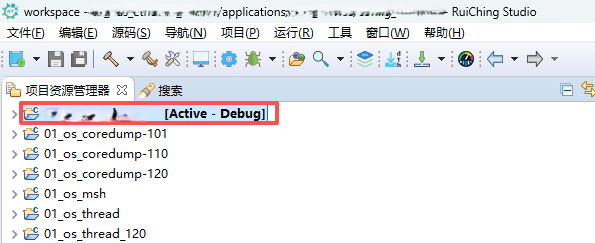

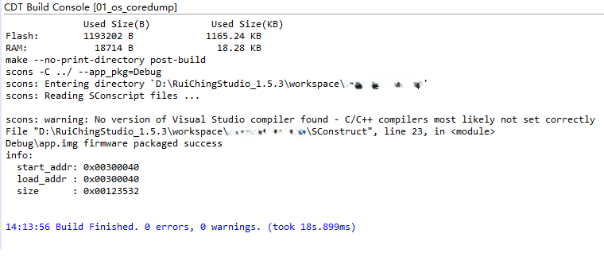
固件下载点击展开


核心示例代码
RTT 端
IPI_SHMEM 示例相关代码说明
rt_device_open:以可读可写的方式打开 ipi_shmem 设备rt_device_write:往共享内存写入数据,指定 cpu 可读rt_device_read:读取指定 cpu 发送的共享内存数据rt_device_control:打印当前共享内存数据,可指定需要查看的内存范围rt_device_set_rx_indicate:设置 ipi_shmem 的接收回调函数rt_thread_create:创建 ipi_shmem 线程rt_thread_startup:启动 ipi_shmem 线程
- ipi_shmem 初始化
static rt_err_t _ipi_shmem_callback(rt_device_t dev, rt_size_t size)
{
    rt_sem_release(_ipi_shmem_sem);
}

static void _ipi_shmem_init(void)
{
    rt_err_t ret = RT_EOK;

    _ipi_shmem_dev = rt_device_find(IPI_DEV_NAME);
    if (_ipi_shmem_dev == RT_NULL)
    {
        rt_kprintf("can't find the device ipi_shmem\n");
        goto __exit;
    }

    if (_ipi_shmem_sem == RT_NULL)
    {
        _ipi_shmem_sem = rt_sem_create("ipi_shmem_sem", 0, RT_IPC_FLAG_PRIO);
        if (_ipi_shmem_sem == RT_NULL)
        {
            rt_kprintf("create ipi_shmem semaphore fail\n");
            goto __exit;
        }
    }

    if (_ipi_shmem_dev->ref_count != 0)
    {
        goto __exit;
    }

    ret = rt_device_init(_ipi_shmem_dev);
    if (ret != RT_EOK)
    {
        rt_kprintf("ipi_shmem init err\n");
        rt_sem_delete(_ipi_shmem_sem);
        _ipi_shmem_sem = RT_NULL;
        goto __exit;
    }

    ret = rt_device_open(_ipi_shmem_dev, RT_DEVICE_OFLAG_RDWR);//打开 ipi_shmem 设备
    if (ret != RT_EOK)
    {
        rt_kprintf("ipi_shmem open err\n");
        rt_sem_delete(_ipi_shmem_sem);
        _ipi_shmem_sem = RT_NULL;
        goto __exit;
    }

    ret = rt_device_set_rx_indicate(_ipi_shmem_dev, _ipi_shmem_callback);//设置接收回调函数
    if (ret != RT_EOK)
    {
        rt_kprintf("ipi_shmem attach callback err\n");
        rt_device_close(_ipi_shmem_dev);
        rt_sem_delete(_ipi_shmem_sem);
        _ipi_shmem_sem = RT_NULL;
        goto __exit;
    }

__exit:

    return;
}- ipi_shmem 示例线程
static void _ipi_shmem_thread_entry(void *parm)
{
    rt_uint32_t cnt = 0, index = 0;
    ipi_shmem_dis_t ipi_shmem_dis = {0, LIST_DATA_SIZE};
    ipi_shmem_dev_t *ipi_shmem = RT_NULL;

    _ipi_shmem_init();

    ipi_shmem = (ipi_shmem_dev_t *)_ipi_shmem_dev->user_data;
    index = ipi_shmem->get_index;
    ipi_shmem_dis.dis_start = index;
    ipi_shmem_dis.dis_end = ipi_shmem_dis.dis_start + LIST_DATA_SIZE;
    rt_device_control(_ipi_shmem_dev, IPI_SHMEM_CTR_DIS_MEM, &ipi_shmem_dis);//打印当前共享内存数据

    rt_kprintf("wait cpu send\n");

    while (1)
    {
        rt_sem_take(_ipi_shmem_sem, RT_WAITING_FOREVER);

        rt_kprintf("\n--- iteration %d ---\n", cnt + 1);

        _share_read(IPI_SHMEM_A72_0);

        _share_write(IPI_SHMEM_A72_0);

        if (++cnt == TEST_CNT)
        {
            break;
        }
    }

    rt_device_control(_ipi_shmem_dev, IPI_SHMEM_CTR_DIS_MEM, &ipi_shmem_dis);

    rt_device_close(_ipi_shmem_dev);
    rt_device_set_rx_indicate(_ipi_shmem_dev, RT_NULL);//设置接收回调函数
    if (_ipi_shmem_sem != RT_NULL)
    {
        rt_sem_delete(_ipi_shmem_sem);
        _ipi_shmem_sem = RT_NULL;
    }
}
Linux 端
ipi_shmem 示例相关 API
open(IPI_SHMEM_DEVICE_PATH, O_RDWR):以可读可写的方式打开 ipi_shmem 设备ioctl(fd, IPI_SHMEM_SET_DEST_CPU, IPI_SHMEM_SEND_CPU):设置发送的目标 cpuwrite(fd, data, len):往共享内存写入数据read(fd, buffer, max_len):读取共享内存数据
ipi_shmem 写数据
int ipi_shmem_send(const void *data, size_t len)
{
    if (fd < 0)
    {
        printf("[ERROR] Device not opened\n");
        return -1;
    }

    if (ioctl(fd, IPI_SHMEM_SET_DEST_CPU, IPI_SHMEM_SEND_CPU) < 0)
    {
        perror("Failed to set destination CPU");
        printf("Error: %s (errno: %d)\n", strerror(errno), errno);
        return -1;
    }
    ssize_t result = write(fd, data, len);
    if (result < 0)
    {
        perror("Failed to send data via shmem");
        printf("Write error: %s (errno: %d)\n", strerror(errno), errno);
        return -1;
    }

    printf("[SUCCESS] Sent %zd bytes via shmem\n", result);
    printf("send:");
    print_hex_buffer(data, len);

    return 0;
}
ipi_shmem 读数据
int ipi_shmem_receive_epoll(void *buffer, size_t max_len, int timeout_ms)
{
    if (fd < 0)
    {
        printf("[ERROR] Device not opened\n");
        return -1;
    }

    int epfd = epoll_create1(EPOLL_CLOEXEC);
    if (epfd == -1)
    {
        perror("epoll_create1 failed");
        return -1;
    }

    struct epoll_event ev, events[1];
    ev.events = EPOLLIN | EPOLLET;
    ev.data.fd = fd;

    if (epoll_ctl(epfd, EPOLL_CTL_ADD, fd, &ev) == -1)
    {
        perror("epoll_ctl: fd failed");
        close(epfd);
        return -1;
    }

    int nfds = epoll_wait(epfd, events, 1, timeout_ms);

    if (nfds == -1)
    {
        perror("epoll_wait failed");
        close(epfd);
        return -1;
    }
    else if (nfds == 0)
    {
        printf("[TIMEOUT] Timeout waiting for shmem data\n");
        close(epfd);
        return -1;
    }
    else
    {
        if (events[0].data.fd == fd && (events[0].events & EPOLLIN))
        {
            ssize_t result = read(fd, buffer, max_len);
            if (result < 0)
            {
                perror("Failed to receive data from ipi shmem");
                printf("Read error: %s (errno: %d)\n", strerror(errno), errno);
                close(epfd);
                return -1;
            }

            printf("[SUCCESS] Received %zd bytes from ipi shmem\n", result);
            print_hex_buffer(buffer, result);
            close(epfd);
            return result;
        }
        else
        {
            printf("[ERROR] Unexpected event\n");
            close(epfd);
            return -1;
        }
    }
}
ipi_shmem 示例代码
int main(void)
{
    char send_data[NUM_OF_DATA_ONCE + 1], recv_buffer[NUM_OF_DATA_ONCE + 1];
    int recv_result = 0;
    int i = 0, j = 0;

    printf("=== Rockchip Ipi Shmem Demo Application ===\n");

    if (ipi_shmem_open() < 0)
    {
        printf("[FATAL] Failed to open ipi_shmem device, exiting\n");
        return -1;
    }

    for (j = 0; j < NUM_OF_DATA_ONCE; j++)
    {
        send_data[j] = j + 1 + i;
    }

    printf("\n--- Iteration %d ---\n", i + 1);
    if (ipi_shmem_send(send_data, NUM_OF_DATA_ONCE) != 0)
    {
        printf("[ERROR] Failed to send message %d\n", i);
    }

    for (i = 0; i < TEST_CNT; i++)
    {
        recv_result = ipi_shmem_receive_epoll(recv_buffer, sizeof(recv_buffer), 20000);
        if (recv_result <= 0)
        {
            printf("[INFO] No immediate response received\n");
        }

        if (i == 4)
        {
            break;
        }

        sleep(1);

        printf("\n--- Iteration %d ---\n", i + 2);

        for (j = 0; j < NUM_OF_DATA_ONCE && j < recv_result; j++)
        {
            send_data[j] = recv_buffer[j] + 1;
        }

        if (ipi_shmem_send(send_data, NUM_OF_DATA_ONCE) != 0)
        {
            printf("[ERROR] Failed to send message %d\n", i + 1);
        }
    }

    ipi_shmem_close();

    printf("\n=== Test completed ===\n");

    return 0;
}
运行程序
先在 RTT 侧串口终端输入ipi_shmem_example,然后在 Linux 侧串口终端输入ipi_shmem_demo,然后就会看到如下打印:
RTT 串口终端
msh />ipi_shmem_example
ipi_shmem display:
src_cpuid:0x0 dst_cpuid:0x0 len:0 fifo_get:0 fifo_put:0
fifo_buffer [byte 0~100]:
0000-0009: 00 00 00 00 00 00 00 00 00 00
000A-0013: 00 00 00 00 00 00 00 00 00 00
0014-001D: 00 00 00 00 00 00 00 00 00 00
001E-0027: 00 00 00 00 00 00 00 00 00 00
0028-0031: 00 00 00 00 00 00 00 00 00 00
0032-003B: 00 00 00 00 00 00 00 00 00 00
003C-0045: 00 00 00 00 00 00 00 00 00 00
0046-004F: 00 00 00 00 00 00 00 00 00 00
0050-0059: 00 00 00 00 00 00 00 00 00 00
005A-0063: 00 00 00 00 00 00 00 00 00 00
wait cpu send

msh />
--- iteration 1 ---
recv data:
0000-0009: 01 02 03 04 05 06 07 08 09 0A
send data:
0000-0009: 21 1B 19 7E E4 75 8E C6 87 85

--- iteration 2 ---
recv data:
0000-0009: 22 1C 1A 7F E5 76 8F C7 88 86
send data:
0000-0009: 58 DD 24 E6 9D 5D 44 40 8B 5A

--- iteration 3 ---
recv data:
0000-0009: 59 DE 25 E7 9E 5E 45 41 8C 5B
send data:
0000-0009: 23 5E A9 EF EC 3F 91 9C 7A 41

--- iteration 4 ---
recv data:
0000-0009: 24 5F AA F0 ED 40 92 9D 7B 42
send data:
0000-0009: 17 18 72 EB 06 F2 91 EE B8 6C

--- iteration 5 ---
recv data:
0000-0009: 18 19 73 EC 07 F3 92 EF B9 6D
send data:
0000-0009: BE D9 34 F7 34 23 06 7A 33 70
ipi_shmem display:
src_cpuid:0x100 dst_cpuid:0x1 len:10 fifo_get:100 fifo_put:100
fifo_buffer [byte 0~100]:
0000-0009: 01 02 03 04 05 06 07 08 09 0A
000A-0013: 21 1B 19 7E E4 75 8E C6 87 85
0014-001D: 22 1C 1A 7F E5 76 8F C7 88 86
001E-0027: 58 DD 24 E6 9D 5D 44 40 8B 5A
0028-0031: 59 DE 25 E7 9E 5E 45 41 8C 5B
0032-003B: 23 5E A9 EF EC 3F 91 9C 7A 41
003C-0045: 24 5F AA F0 ED 40 92 9D 7B 42
0046-004F: 17 18 72 EB 06 F2 91 EE B8 6C
0050-0059: 18 19 73 EC 07 F3 92 EF B9 6D
005A-0063: BE D9 34 F7 34 23 06 7A 33 70
Linux 串口终端
root@RK3576-Tronlong:~# ipi_shmem_demo
=== Rockchip Ipi Shmem Demo Application ===
[SUCCESS] Ipi Shmem device opened successfully with fd: 3
[   74.180788] ipi-shmem ipi-shmem: mbox rec:cmd=0x5A5A cpuid=0x100

--- Iteration 1 ---
[SUCCESS] Sent 10 bytes via shmem
send:[HEX DATA] Buffer content (10 bytes):
             0x01 0x02 0x03 0x04 0x05 0x06 0x07 0x08 0x09 0x0A
[SUCCESS] Received 10 bytes from ipi shmem
[HEX DATA] Buffer content (10 bytes):
             0x21 0x1B 0x19 0x7E 0xE4 0x75 0x8E 0xC6 0x87 0x85

--- Iteration 2 ---
[   75.183258] ipi-shmem ipi-shmem: mbox rec:cmd=0x5A5A cpuid=0x100
[SUCCESS] Sent 10 bytes via shmem
send:[HEX DATA] Buffer content (10 bytes):
             0x22 0x1C 0x1A 0x7F 0xE5 0x76 0x8F 0xC7 0x88 0x86
[SUCCESS] Received 10 bytes from ipi shmem
[HEX DATA] Buffer content (10 bytes):
             0x58 0xDD 0x24 0xE6 0x9D 0x5D 0x44 0x40 0x8B 0x5A

--- Iteration 3 ---
[   76.185711] ipi-shmem ipi-shmem: mbox rec:cmd=0x5A5A cpuid=0x100
[SUCCESS] Sent 10 bytes via shmem
send:[HEX DATA] Buffer content (10 bytes):
             0x59 0xDE 0x25 0xE7 0x9E 0x5E 0x45 0x41 0x8C 0x5B
[SUCCESS] Received 10 bytes from ipi shmem
[HEX DATA] Buffer content (10 bytes):
             0x23 0x5E 0xA9 0xEF 0xEC 0x3F 0x91 0x9C 0x7A 0x41

--- Iteration 4 ---
[   77.188120] ipi-shmem ipi-shmem: mbox rec:cmd=0x5A5A cpuid=0x100
[SUCCESS] Sent 10 bytes via shmem
send:[HEX DATA] Buffer content (10 bytes):
             0x24 0x5F 0xAA 0xF0 0xED 0x40 0x92 0x9D 0x7B 0x42
[SUCCESS] Received 10 bytes from ipi shmem
[HEX DATA] Buffer content (10 bytes):
             0x17 0x18 0x72 0xEB 0x06 0xF2 0x91 0xEE 0xB8 0x6C

--- Iteration 5 ---
[   78.190569] ipi-shmem ipi-shmem: mbox rec:cmd=0x5A5A cpuid=0x100
[SUCCESS] Sent 10 bytes via shmem
send:[HEX DATA] Buffer content (10 bytes):
             0x18 0x19 0x73 0xEC 0x07 0xF3 0x92 0xEF 0xB9 0x6D
[SUCCESS] Received 10 bytes from ipi shmem
[HEX DATA] Buffer content (10 bytes):
             0xBE 0xD9 0x34 0xF7 0x34 0x23 0x06 0x7A 0x33 0x70
[INFO] Ipi Shmem device closed

=== Test completed ===